
This guide provides all official download links for DH PLUS VIP apps, including the 2024 version, Mi Box Downloader codes, the iOS application, and the server activation code.
1. Download DH PLUS VIP APK (All Android Devices)
Official APK Link – DH PLUS VIP ACTIVE CODE
Download: https://bit.ly/47OxAPS
Compatible with:
- TV Boxes
- Android Phones
- Android TV
- FireStick
- Android Tablets
2. Download DH PLUS VIP 2024 APK (Updated Version)
Official APK Link – DH PLUS VIP 2024
Download: http://bit.ly/dhplus2024
This is the latest 2024 optimized version, offering faster performance and an improved interface.
3. DH PLUS VIP for Mi Box (Using Downloader App)

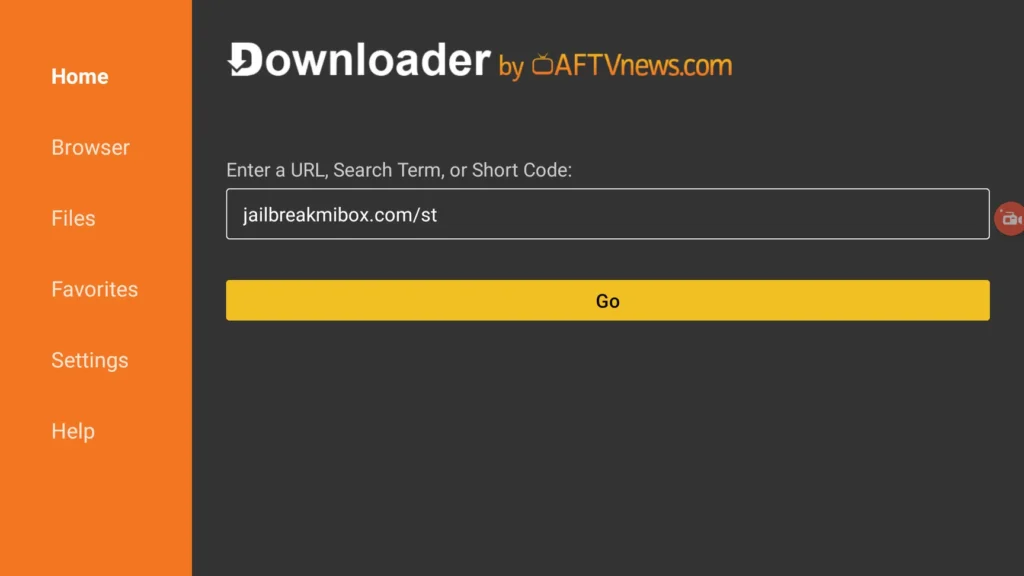
If you are using Mi Box or Android TV, install the app through Downloader:
Downloader Code – DH PLUS VIP
701692
Downloader Code – DH PLUS VIP 2024
887419
How to install on Mi Box:
- Open the Downloader app
- Enter the correct code
- Download will start automatically
- Install the APK and activate your service
4. DH PLUS VIP for Apple iPhone (iOS)
Official App Store Link (iPhone / iPad)

https://apps.apple.com/ma/app/000-player/id1665441224?l=fr-FR
App Name on Apple Store
000PLAYER
Server Code (Required for activation)
3337
Activation steps for iOS:
Wait for channels and VOD to load
Open 000PLAYER
Select Add Server / Code
Enter server code: 3337
5. Activation Instructions (All Devices)
After installing the app:
- Open DH PLUS VIP
- Select Activation / Login
- Enter your Active Code or Server Code 3337
- Wait for channels to refresh
- Enjoy your IPTV service